

Envestnet | Tamarac Offers Goals-Based Reporting in Advisor View™ & Client Portal
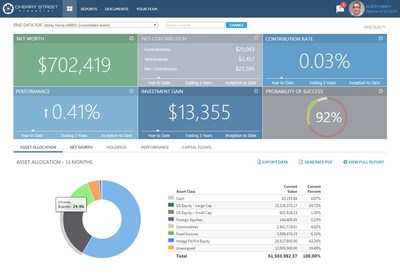
Advisors can now view linked Households data from Advisor View and Advisor CRM® in MoneyGuidePro, and MoneyGuidePro data can be viewed on the Households page in Advisor View. They can also add a tile to the client portal dashboard so clients can view their MoneyGuidePro data and use it to assess the probability of meeting their financial goals. In addition to easily importing and exporting data between Advisor View and MoneyGuidePro, the integration provides single-sign-on access to accounts in Advisor View from MoneyGuidePro.
"To keep clients engaged in this evolving digital world, having direct access to their financial plan and updates to their accounts within a client portal is quickly becoming the must-have form of client communication," said
Advisors can obtain more in-depth risk tolerance data by asking clients to log into MoneyGuide from the Advisor View client portal to fill out a self-evaluation, view and optimize the results, and test the results against risks. MoneyGuide can then send the self-evaluation to the advisor.
Advisors can also access goals-based financial planning tools in Advisor View as part of
Other updates to Advisor View include:

- New Flexible Options for Date Periods: Advisors can now use the inception date of a reporting group or account as the starting date for the Specific Period range, and two new options allow advisors to create rolling date periods.
- Capability to Report on Only Open Accounts: Full-service enterprises can simplify performance reporting by eliminating closed accounts from reports in Advisor View. The day after a closed date for an account is entered, the account's holdings will be transferred out as of the closed date and the transaction information will no longer be tracked.
- New Bulk Reports for Capital Calls & Manual Security Snapshots: Two new bulk reports make it easier for advisors to report on and manage assets that require manual entry. The Account Capital Calls Bulk Report enables advisors to quickly and easily add multiple capital calls to accounts. The Manual Security Snapshots Bulk Report allows advisors to update multiple snapshots for accounts with manual securities simultaneously; the report displays only accounts with manual securities, which can be filtered by date or security criteria, and enables advisors to track snapshot history so they can see who made modifications or deleted snapshots.
- Linking of Service Team Information with Advisor CRM: The level of integration between Advisor View and Advisor CRM has been enhanced, with advisors now able to sync information about Service Teams in both applications. If advisors maintain Service Teams and Service Roles in Advisor View, updates will automatically sync to Advisor CRM for linked Households, allowing advisors to maintain a single source of record which saves time and increases data accuracy.
- Enhanced Email Templates that can Blind Copy Service Teams: Advisors can now add Service Team roles to the Blind Copy Recipient(s) list on the Email page in Advisor View, depending on which roles need to be aware of clients' activities. The Blind Copy Recipient(s) list is also tailored specifically for each template, so different roles can be blind copied for different reports.
The
Advisor CRM
- Deeper Integration Between Advisor CRM & Advisor View:
- Service Team information linked in Advisor View is available on the Account and Financial Account records in Advisor CRM, as well as two new records.
- The Team record in Advisor CRM corresponds to the Generic Users record in Advisor View, enabling advisors to see email distribution lists assigned to Service Teams. Meanwhile,
The Service Team record in Advisor CRM allows users to easily track all roles assigned to Service Teams, as well as edit member information.
- Support for Microsoft Edge Browser:
Envestnet | Tamarac has conducted extensive testing since the release of Microsoft Windows 10, and has added Microsoft Edge to the list of browsers supported by Advisor CRM and the entire Advisor®Xi Suite .
- New Report Showing Beneficiary Data:
- A new report on the Reports menu displays beneficiary data for selected households, and enables advisors to identify accounts where no beneficiary is assigned.
- Advisors can select the new Requires Beneficiary checkbox in records for financial accounts, trusts, and insurance planning documents that need a beneficiary.
- This information makes it easier to prepare for meetings by forcing advisors to ask important questions:
- "Have I had a conversation with my client about the importance of beneficiaries?"
- "Is my client missing any beneficiaries? Do we need to go through an estate planning review?"
- "Are the beneficiaries up-to-date? Did the client just experience a recent life event that may require us to update their beneficiaries?"
Advisor Rebalancing
- Negative Value Positions:
- Advisor Rebalancing can now support short positions, options, and other holdings with negative values.
- Additional features have been implemented to help protect long positions with corresponding negative value positions. These features enable advisors to view a fuller and more accurate picture of their clients' holdings.
- Two Features Added to Dashboard Widgets:
- Advisors now have the ability to set page links for some of the widgets on the Advisor Rebalancing dashboard.
- Advisors can also view underlying accounts on some widgets without having to navigate away from the dashboard.
- Enhanced
Trade Files :- A new Pershing trade file, Pershing EOD Mutual Fund Orders, offers an additional option for trading mutual funds with Pershing. When this file is assigned to an account in Account Settings, advisors can specify if they wish to handle Dividend Reinvestment and Capital Gains Reinvestment in either Cash or Shares.
- Two Schwab trade files, Schwab Web Block Trading and Schwab Allocation Web Trading, now support fractional shares, making the trading and liquidating of these positions more precise.
About
For more information about
Media Contact:
(973) 850-7305
dtaormina@jconnelly.com
Photo - http://photos.prnewswire.com/prnh/20161019/430723
Logo - http://photos.prnewswire.com/prnh/20130919/MM83257LOGO
To view the original version on PR Newswire, visit:http://www.prnewswire.com/news-releases/envestnet--tamarac-offers-goals-based-reporting-in-advisor-view--client-portal-300348285.html
SOURCE


MetLife Launches New Global Brand Platform
Advisor News
- CT governor’s candidates claims: What’s true, and what’s misleading
- Retaining clients by giving them a memorable experience
- Addressing the longevity paradox
- Employers shift focus from retirement access to financial outcomes
- Helping widowed clients navigate their new financial reality
More Advisor NewsAnnuity News
- Symetra and TIAA Announce Launch of Mariner Re
- Jackson Launches Suite of Fixed Index Annuities Focused on Accumulation
- Farm Bureau P&C insurers post first underwriting gain since 2021
- Legacy Marketing, Malibu Life launch two fixed indexed annuities
- Changing client priorities are reshaping annuity conversations
More Annuity NewsHealth/Employee Benefits News
- The percentage of people without health insurance is growing
- Shopping for ACA plan this year? Here’s what you need to know
- 10 things to know about open enrollment for 2027
- WITH FEDERAL MEDICAID CHANGES, BROWN STUDENTS AIM TO HELP PEOPLE STAY COVERED ON HEALTH INSURANCE
- HEALTH COVERAGE CONSUMERS SHOULD BE WARY OF SUBPAR PRODUCTS
More Health/Employee Benefits NewsLife Insurance News